Improving Query Performance with Indexes using Prisma: B-Tree Indexes

A B-tree index is the default index type in PostgreSQL. It stores a sorted copy of the indexed columns, so the database can find matching rows in logarithmic time instead of scanning the whole table. In this article you will see how B-tree indexes work, then measure their effect directly: a filtered query over 500,000 rows drops from roughly 66ms to under 1ms, an improvement of about 80x, after adding a single @@index line to a Prisma ORM schema. Every command and number in this walkthrough was verified on Prisma ORM 7.8 and PostgreSQL 17.
Updated (July 2026): Fully revised for Prisma ORM 7: the walkthrough uses the
prisma-clientgenerator, a driver adapter, and a local Prisma Postgres database, and every command and number was verified end-to-end on Prisma ORM 7.8 and PostgreSQL 17.
Introduction
The first part of this series covered the fundamentals of database indexes: what they are, types of indexes, the anatomy of a database query, and the cost of using indexes in your database.
In this part, you will dive a little deeper into indexes: learning the data structure that makes indexes powerful, and then working through a concrete example where you improve the performance of a query with an index using Prisma ORM.
The data structure that powers indexes
Database indexes are smaller secondary data structures used by the database to store a subset of a table's data. They're collections of key-value pairs:
- key: the column(s) that will be used to create an index
- value: a pointer to the record in the specific table
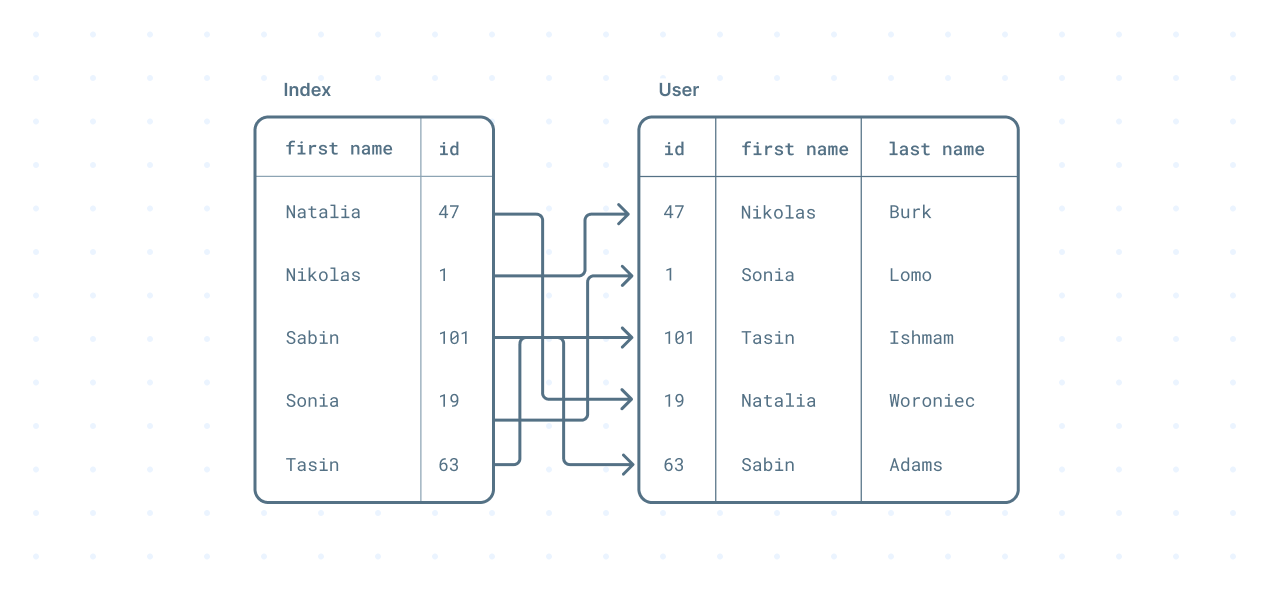
However, the data structures used to define an index are more sophisticated, making them as fast as they are.
The default data structure used when defining an index is the B-tree. B-trees are self-balancing tree data structures that maintain sorted data. Every update to the tree (an insert, update, or delete) rebalances the tree. This Fullstack Academy video provides a great conceptual overview of the B-tree data structure.
In a database context, every write to an indexed column updates the associated index.
The time complexity of a B-tree
A sequential scan has a linear time complexity (O(n)). This means the time taken to retrieve a record has a linear relationship to the number of records you have.
If you're unfamiliar with the concept of Big O notation, take a look at What is Big O notation.
B-trees, on the other hand, have a logarithmic time complexity (O log(n)). It means that as your data grows in size, the cost of retrieving a record grows at a significantly slower rate.
Database providers, such as PostgreSQL and MySQL, have different implementations of the B-tree which are a little more intricate.
When to use a B-tree index
B-tree indexes work with equality (=) or range comparison (<, <=,>, >=) operators. This means that if you're using any of these operators when querying your data, a B-tree index would be the right choice.
In some special situations, the database can utilize a B-tree index using string comparison operators such as LIKE.
How to add an index with Prisma ORM
With the theory out of the way, let's take a look at a concrete example. You will build a small project from scratch, run a deliberately slow query against half a million rows, inspect the query plan, and then fix it with an index.
Prerequisites
To follow along, you will need:
- Node.js 20 or later
- Some familiarity with JavaScript/TypeScript and the terminal
That's the whole list. You don't need Docker or a database server: the Prisma CLI ships with a local Prisma Postgres server you can start with a single command.
Set up the project
Create a new project and install the dependencies:
mkdir prisma-indexes && cd prisma-indexes
npm init -y
npm install prisma @prisma/client @prisma/adapter-pg @faker-js/faker dotenv tsx typescript @types/node
The packages you will use:
prismaand@prisma/client: the Prisma CLI and Prisma Client@prisma/adapter-pg: the driver adapter that connects Prisma Client to Postgres vianode-postgres. Prisma ORM 7 requires a driver adapter.@faker-js/faker: generates the fake user data you will seeddotenv,tsx,typescript: environment loading and TypeScript execution
Define the schema and configuration
Create a prisma/schema.prisma file with a single User model:
// prisma/schema.prisma
generator client {
  provider = "prisma-client"
  output   = "../src/generated/prisma"
}

datasource db {
  provider = "postgresql"
}

model User {
  id        Int    @id @default(autoincrement())
  firstName String
  lastName  String
  email     String
}
Two things changed here compared to older Prisma versions:
- The
prisma-clientgenerator writes Prisma Client into your project source (here:src/generated/prisma), and theoutputpath is required. - The
datasourceblock no longer contains aurl. Since Prisma ORM 7, connection URLs for the CLI live inprisma.config.ts.
Create the prisma.config.ts file in the project root:
// prisma.config.ts
import 'dotenv/config'
import { defineConfig } from 'prisma/config'

export default defineConfig({
  datasource: {
    url: process.env.DATABASE_URL!,
  },
  migrations: {
    seed: 'npx tsx prisma/seed.ts',
  },
})Note: Prisma ORM 7 does not load
.envfiles automatically. Theimport 'dotenv/config'line at the top handles that for the CLI. Your application and seed scripts need the same import, and forgetting it is a common source of connection errors againstlocalhost:5432.
Start a local Prisma Postgres database
Start a local Prisma Postgres server:
npx prisma devAfter a few seconds it prints a connection string. Copy it into a .env file in your project root:
# .env
DATABASE_URL="postgres://postgres:postgres@localhost:51214/template1?sslmode=disable&connection_limit=10&connect_timeout=0&max_idle_connection_lifetime=0&pool_timeout=0&socket_timeout=0"
Leave prisma dev running in that terminal and use a second terminal for the rest of the walkthrough. When you later want a hosted database with the same workflow, npx prisma init --db provisions a cloud Prisma Postgres instance on a free tier.
Create and seed the database
Create a seed script that inserts 500,000 users in batches:
// prisma/seed.ts
import 'dotenv/config'
import { faker } from '@faker-js/faker'
import { PrismaPg } from '@prisma/adapter-pg'
import { PrismaClient } from '../src/generated/prisma/client'

const adapter = new PrismaPg({ connectionString: process.env.DATABASE_URL! })
const prisma = new PrismaClient({ adapter })

async function main() {
  await prisma.user.deleteMany()

  const total = 500_000
  const batchSize = 10_000

  for (let i = 0; i < total / batchSize; i++) {
    const data = Array.from({ length: batchSize }).map(() => {
      const firstName = faker.person.firstName()
      const lastName = faker.person.lastName()
      const email = faker.internet.email({ firstName, lastName })
      return { firstName, lastName, email }
    })
    await prisma.user.createMany({ data })
    console.log(`Seeded ${(i + 1) * batchSize} users`)
  }
}

main().finally(() => prisma.$disconnect())
Push the schema to the database, generate Prisma Client, and run the seed:
npx prisma db push
npx prisma generate
npx prisma db seed
db push syncs the schema straight to the database, which is the fastest loop for local prototyping. For a production application backed by a hosted database you would capture schema changes as migration files with prisma migrate dev instead. Seeding half a million rows takes about 40 seconds.
Measure the slow query
The original version of this article measured query time with prisma.$use() middleware. Middleware was removed from Prisma ORM; the current way to wrap queries is a Prisma Client extension. Create a measurement script:
// src/measure.ts
import 'dotenv/config'
import { PrismaPg } from '@prisma/adapter-pg'
import { PrismaClient } from './generated/prisma/client'

const adapter = new PrismaPg({ connectionString: process.env.DATABASE_URL! })

const prisma = new PrismaClient({ adapter }).$extends({
  query: {
    async $allOperations({ model, operation, args, query }) {
      const start = performance.now()
      const result = await query(args)
      const ms = performance.now() - start
      console.log(`${model}.${operation} took ${ms.toFixed(0)}ms`)
      return result
    },
  },
})

async function main() {
  // Grab a first name that exists in your seeded data
  const sample = await prisma.user.findFirst({ select: { firstName: true } })
  const name = sample!.firstName
  console.log('Searching for firstName =', name)

  for (let i = 0; i < 3; i++) {
    const users = await prisma.user.findMany({ where: { firstName: name } })
    if (i === 0) console.log(`matches: ${users.length}`)
  }

  // Ask Postgres for the query plan. String interpolation is fine for a
  // local debugging script; use $queryRaw with parameters in application code.
  const plan = await prisma.$queryRawUnsafe<{ 'QUERY PLAN': string }[]>(
    `EXPLAIN ANALYZE SELECT * FROM "User" WHERE "firstName" = '${name.replace(/'/g, "''")}'`
  )
  console.log('\n--- EXPLAIN ANALYZE ---')
  for (const row of plan) console.log(row['QUERY PLAN'])
}

main().finally(() => prisma.$disconnect())
The $allOperations hook times every Prisma query at the application level, and the EXPLAIN ANALYZE statement shows what Postgres actually does to answer it. Run the script:
npx tsx src/measure.tsHere is the output from our run (your name and exact numbers will differ):
User.findFirst took 85ms
Searching for firstName = Hubert
User.findMany took 113ms
matches: 326
User.findMany took 73ms
User.findMany took 71ms

--- EXPLAIN ANALYZE ---
Seq Scan on "User"  (cost=0.00..8374.44 rows=1476 width=100) (actual time=0.039..66.191 rows=326 loops=1)
  Filter: ("firstName" = 'Hubert'::text)
  Rows Removed by Filter: 499674
Planning Time: 0.108 ms
Execution Time: 66.524 ms
The plan tells the whole story. Seq Scan means Postgres read the entire table. It inspected all 500,000 rows and threw away 499,674 of them to find 326 matches, spending about 66ms. This is the linear time complexity from the theory section, measured on real data.
If you prefer log-based visibility, Prisma Client can also emit an event for every SQL query it runs. Pass
log: [{ emit: 'event', level: 'query' }]to thePrismaClientconstructor and subscribe withprisma.$on('query', (e) => ...)to see the SQL, parameters, and duration of each query.
Improve query performance with an index
You can add an index to a field in the Prisma schema using the @@index() attribute. Update the User model by adding an index to the firstName field:
// prisma/schema.prisma
model User {
  id        Int    @id @default(autoincrement())
  firstName String
  lastName  String
  email     String

  @@index([firstName])
}
@@index supports more arguments, such as map to control the index name in the database. You can learn more in the Prisma Schema API Reference.
Because the index is declared in your Prisma schema rather than hand-run against the database, it lives in code: it gets reviewed with the rest of your changes, applies identically in every environment, and gives both your team and your coding agent one source of truth for the data layer.
Apply the change:
npx prisma db pushBehind the scenes, Postgres now has a new B-tree index:
CREATE INDEX "User_firstName_idx" ON "User" USING btree ("firstName");Run the measurement script again:
npx tsx src/measure.tsUser.findFirst took 80ms
Searching for firstName = Hubert
User.findMany took 25ms
matches: 326
User.findMany took 6ms
User.findMany took 5ms
--- EXPLAIN ANALYZE ---
Bitmap Heap Scan on "User" (cost=31.80..4115.01 rows=2500 width=100) (actual time=0.092..0.416 rows=326 loops=1)
Recheck Cond: ("firstName" = 'Hubert'::text)
Heap Blocks: exact=314
-> Bitmap Index Scan on "User_firstName_idx" (cost=0.00..31.17 rows=2500 width=0) (actual time=0.047..0.047 rows=326 loops=1)
Index Cond: ("firstName" = 'Hubert'::text)
Planning Time: 0.085 ms
Execution Time: 0.814 msThe sequential scan is gone. Postgres now uses a Bitmap Index Scan on the new index to locate the 326 matching rows directly, and execution time drops from 66.5ms to 0.8ms, roughly an 80x improvement. At the application level, the repeated findMany calls settle around 5ms instead of 71ms.
Note that the findFirst warm-up query stays at about 80ms: it has no where clause on an indexed column, so the index does nothing for it. Indexes speed up the queries that filter or sort on the indexed columns, and only those.
Bonus: Add an index to multiple fields
You can also add an index on multiple columns. Update the index by adding the lastName field:
// prisma/schema.prisma
model User {
  id        Int    @id @default(autoincrement())
  firstName String
  lastName  String
  email     String

  @@index([firstName, lastName])
}
You can take this a step further by sorting the firstName column in the index in descending order:
// prisma/schema.prisma
model User {
  id        Int    @id @default(autoincrement())
  firstName String
  lastName  String
  email     String

  @@index([firstName(sort: Desc), lastName])
}
Apply either variant with another npx prisma db push. The sorted composite version produces this index in Postgres:
CREATE INDEX "User_firstName_lastName_idx" ON "User" USING btree ("firstName" DESC, "lastName");A composite index like this one serves queries that filter on firstName alone as well as queries that filter on both fields, because firstName is the leading column. It does nothing for queries that filter only on lastName.
Frequently asked questions
Summary and next steps
In this part, you learned what the structure of indexes looks like, and significantly improved a query's response time by adding an index to a field: from a 66ms sequential scan over 500,000 rows to a sub-millisecond index scan, verified with EXPLAIN ANALYZE.
You also learned how to add indexes to multiple columns, how to define the index sort order, and how to measure query time in Prisma ORM 7 with a client extension now that middleware is gone.
The workflow you used here carries beyond the local server. npx prisma init --db provisions a managed Prisma Postgres database with the same schema-first workflow, so the index you declared in code applies to production exactly the way it did locally. And if you are building new applications with AI coding agents, Prisma Next (Early Access, becoming Prisma 8) extends the same idea further: the schema becomes a central data contract that you or your agent evolve with type-safe queries and structured, machine-readable output.
In the next article, you will learn how to work with Hash indexes in your application using Prisma ORM.
Build your next app with Prisma
Start free. Scale when you’re ready.