The Ultimate Guide to Testing with Prisma: Integration Testing

To integration test an app that uses Prisma ORM, you run the tests against a real database, reset that database between tests, and drive the API the way a client would. This article sets up an integration testing environment with Vitest, Supertest, and a local Prisma Postgres database, then writes integration tests for an Express API. This is part 3 of a five-part series on testing with Prisma ORM.
Updated (July 2026): This article was rewritten for Prisma ORM 7 and the current stack. All code was executed against Prisma ORM 7.8.0,
@prisma/client7.8.0,@prisma/adapter-pg7.8.0, Vitest 4.1.10,supertest7.2.2,bcrypt6.0.0, andjsonwebtoken9.0.3 on Node.js 22. The biggest change from the original 2023 article: the test database is now a local Prisma Postgres instance started withnpx prisma dev(powered by PGlite), which removes the Docker Compose setup, thewait-for-it.shscript, and the custom bash orchestration entirely. Vitest'sthreads: falseoption is also gone; the current option to disable parallelism isfileParallelism: false.
Introduction
So far in this series you mocked Prisma Client and used the mock to write unit tests against small, isolated units of code. In this article you will say goodbye to the mocked client and write integration tests against a real database.
What is integration testing?
Where unit tests confirm the smallest building blocks work in isolation, integration testing takes related components and confirms they work together.
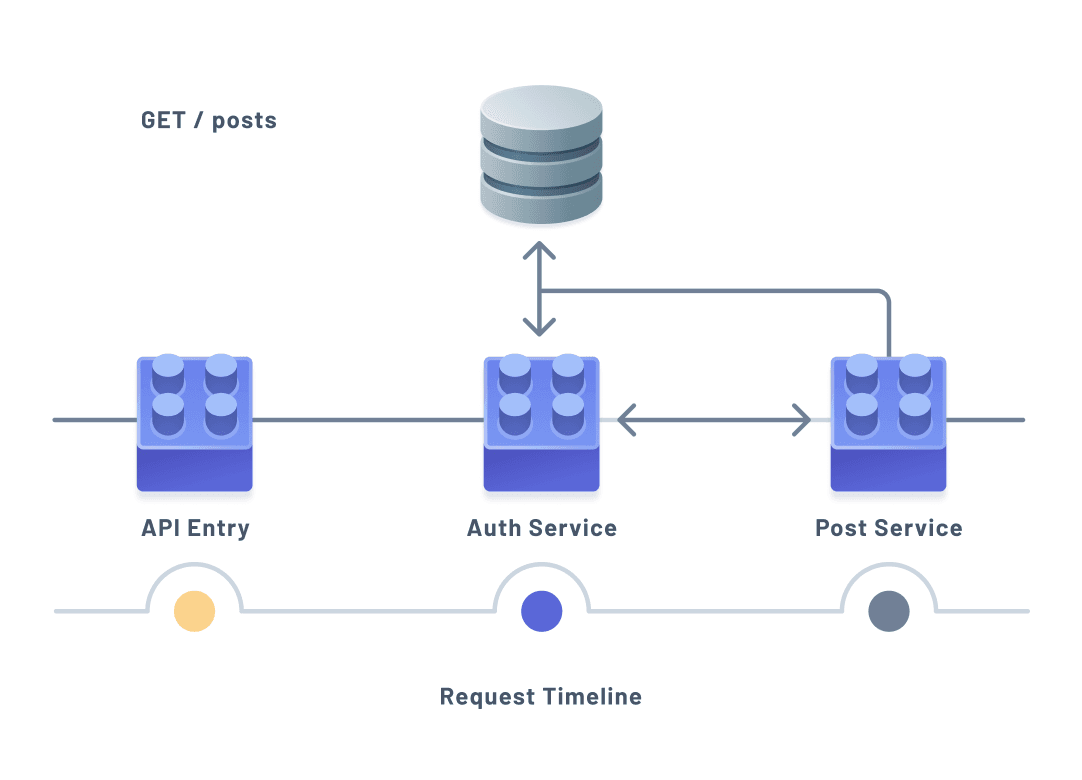
The diagram illustrates a request that hits the database multiple times across different components. Because integration tests exercise these interactions, they run against a real database rather than a mock.
Technologies you will use
- Vitest 4
- Prisma ORM 7 with the
prisma-clientgenerator and the@prisma/adapter-pgdriver adapter - Node.js 20 or later
- Prisma Postgres running locally
- Supertest
Assumed knowledge
- Basic knowledge of JavaScript or TypeScript
- Basic knowledge of Prisma Client and its queries
- The project setup and unit tests from part 1 and part 2
Start a local test database
The original version of this article ran Postgres in a Docker container and orchestrated it with a shell script. On Prisma ORM 7 you can start a local Prisma Postgres database with a single command, no Docker required. It runs locally and is powered by PGlite.
In one terminal, start the database:
npx prisma dev -n testing✔ Your local Prisma Postgres server testing is now running 👍
🔌 To connect with Prisma ORM use the following connection strings:
DATABASE_URL="postgres://postgres:postgres@localhost:51254/template1?sslmode=disable&connection_limit=10&connect_timeout=0&max_idle_connection_lifetime=0&pool_timeout=0&socket_timeout=0"Leave that running. Put the DATABASE_URL it printed, along with an API_SECRET, in your .env file:
# .env
DATABASE_URL="postgres://postgres:postgres@localhost:51254/template1?sslmode=disable&..."
API_SECRET="supersecretstring"
The API_SECRET is a secret key the authentication service uses to sign session tokens. In production, use a long random string.
Apply your schema to the database and generate the client:
npx prisma db push
npx prisma generate
🚀 Your database is now in sync with your Prisma schema. Done in 71ms
✔ Generated Prisma Client (7.8.0) to ./src/generated/prisma in 43msNote:
prisma db pushis the right fit for a test database: it syncs the schema without creating migration files. Remember that on Prisma 7 you must runnpx prisma generateyourself after any schema change, becausedb pushandmigrate devno longer regenerate the client.
Add a Vitest configuration for integration tests
In part 2 you created vitest.config.unit.ts. Create a second config, vitest.config.integration.ts, for integration tests:
// vitest.config.integration.ts
import { defineConfig } from 'vitest/config'

export default defineConfig({
  test: {
    include: ['src/tests/**/*.test.ts'],
    fileParallelism: false,
    setupFiles: ['src/tests/helpers/setup.ts']
  }
})
Three things here:
test.includepoints to.tsfiles insrc/tests, so integration tests live in their own folder.fileParallelism: falseruns test files one at a time. This matters because the tests share one database; running them in parallel would cause them to see each other's data.setupFilesruns a setup file before your tests, used below to reset the database.
Updated (July 2026): The original used
threads: false. On Vitest 4 that option no longer exists; setting it has no effect (verified: the tests still ran in parallel-capable pools). The current way to force serial execution isfileParallelism: false.
Keep the unit config scoped so it does not pick up integration tests:
// vitest.config.unit.ts
import { defineConfig } from 'vitest/config'

export default defineConfig({
  test: {
    include: ['src/**/*.test.ts', '!src/tests']
  }
})
Reset the database between tests
Each integration test should start from a clean slate. Create a helper that instantiates a client for the tests. It uses the driver adapter and reads env, so it imports dotenv/config:
// src/tests/helpers/prisma.ts
import 'dotenv/config'
import { PrismaPg } from '@prisma/adapter-pg'
import { PrismaClient } from '../../generated/prisma/client'

const adapter = new PrismaPg({ connectionString: process.env.DATABASE_URL! })
const prisma = new PrismaClient({ adapter })
export default prisma
Add a reset function that clears every table inside a transaction:
// src/tests/helpers/reset-db.ts
import prisma from './prisma'

export default async () => {
  await prisma.$transaction([
    prisma.tag.deleteMany(),
    prisma.quote.deleteMany(),
    prisma.post.deleteMany(),
    prisma.user.deleteMany()
  ])
}
Then run that reset before every test using Vitest's beforeEach in the setup file:
// src/tests/helpers/setup.ts
import resetDb from './reset-db'
import { beforeEach } from 'vitest'

beforeEach(async () => {
  await resetDb()
})
Because you registered this file in setupFiles, every test across src/tests now starts with an empty database.
Configure npm scripts
Add scripts to package.json to run the integration tests:
{
  "scripts": {
    "test:int": "vitest -c ./vitest.config.integration.ts",
    "test:int:ui": "vitest -c ./vitest.config.integration.ts --ui"
  }
}
With the database running, npm run test:int will connect to it directly. There is no container to spin up and no readiness script to wait on.
Write the integration tests
When deciding what to integration test, focus on the interactions between components. In this Express API, the important groupings are routes, controllers, and services. A request enters a route, the controller handles it, and services talk to the database.
You will test the /auth/signup and /auth/signin routes, driving them over HTTP so the tests mimic a real client.
Set up the test file
Create src/tests/auth.test.ts. Use Supertest to send requests to the Express app, and import the Prisma helper to inspect the database:
npm i -D supertest @types/supertest// src/tests/auth.test.ts
import 'dotenv/config'
import { beforeEach, describe, expect, it } from 'vitest'
import request from 'supertest'
import jwt from 'jsonwebtoken'
import bcrypt from 'bcrypt'
import app from '../lib/createServer'
import prisma from './helpers/prisma'
describe('/auth', () => {
describe('[POST] /auth/signup', () => {
// signup tests
})
})Tests for /auth/signup
The signup route creates a user from a username and password. Reading the controller and router, the behaviors worth testing are:
- It responds with
200and the user details. - It responds with a valid session token on success.
- It responds with
400if a user already exists with that username. - It responds with
400if the request body is invalid.
// src/tests/auth.test.ts (inside the [POST] /auth/signup describe)
it('should respond with a `200` status code and user details', async () => {
  const { status, body } = await request(app).post('/auth/signup').send({
    username: 'testusername',
    password: 'testpassword'
  })
  const newUser = await prisma.user.findFirst()
  expect(status).toBe(200)
  expect(newUser).not.toBeNull()
  expect(body.user).toStrictEqual({
    username: 'testusername',
    id: newUser?.id
  })
})

it('should respond with a valid session token when successful', async () => {
  const { body } = await request(app).post('/auth/signup').send({
    username: 'testusername',
    password: 'testpassword'
  })
  expect(body).toHaveProperty('token')
  expect(jwt.verify(body.token, process.env.API_SECRET as string))
})

it('should respond with a `400` if a user already exists with that username', async () => {
  await prisma.user.create({
    data: { username: 'testusername', password: 'somepassword' }
  })

  const { status, body } = await request(app).post('/auth/signup').send({
    username: 'testusername',
    password: 'testpassword'
  })

  const count = await prisma.user.count()
  expect(status).toBe(400)
  expect(count).toBe(1)
  expect(body).not.toHaveProperty('user')
})

it('should respond with a `400` if an invalid request body is provided', async () => {
  const { body, status } = await request(app).post('/auth/signup').send({
    email: 'test@prisma.io', // should be username
    password: 'testpassword'
  })
  expect(status).toBe(400)
  expect(body.message).toBe('Invalid or missing input provided for: username')
})
Each test drives a real HTTP request through Supertest, then uses prisma to check what actually landed in the database. No modules are mocked; these run against the live database, and the setup file clears it between each test.
Tests for /auth/signin
The signin route validates an existing user. Its tests need a user in the database first, so use beforeEach inside this suite to create one. Match the same password hashing the auth service uses:
// src/tests/auth.test.ts (add a sibling describe)
describe('[POST] /auth/signin', () => {
  beforeEach(async () => {
    await prisma.user.create({
      data: {
        username: 'testusername',
        password: bcrypt.hashSync('testpassword', 8)
      }
    })
  })

  it('should respond with a `200` when provided valid credentials', async () => {
    const { status } = await request(app).post('/auth/signin').send({
      username: 'testusername',
      password: 'testpassword'
    })
    expect(status).toBe(200)
  })

  it('should respond with the user details when successful', async () => {
    const { body } = await request(app).post('/auth/signin').send({
      username: 'testusername',
      password: 'testpassword'
    })
    const keys = Object.keys(body.user)
    expect(keys.length).toBe(2)
    expect(keys).toStrictEqual(['id', 'username'])
    expect(body.user.username).toBe('testusername')
  })

  it('should respond with a valid session token when successful', async () => {
    const { body } = await request(app).post('/auth/signin').send({
      username: 'testusername',
      password: 'testpassword'
    })
    expect(body).toHaveProperty('token')
    expect(jwt.verify(body.token, process.env.API_SECRET as string))
  })

  it('should respond with a `400` when given invalid credentials', async () => {
    const { body, status } = await request(app).post('/auth/signin').send({
      username: 'testusername',
      password: 'wrongpassword'
    })
    expect(status).toBe(400)
    expect(body).not.toHaveProperty('token')
  })

  it('should respond with a `400` when the user cannot be found', async () => {
    const { body, status } = await request(app).post('/auth/signin').send({
      username: 'wrongusername',
      password: 'testpassword'
    })
    expect(status).toBe(400)
    expect(body).not.toHaveProperty('token')
  })

  it('should respond with a `400` when given an invalid request body', async () => {
    const { body, status } = await request(app).post('/auth/signin').send({
      email: 'test@prisma.io', // should be username
      password: 'testpassword'
    })
    expect(status).toBe(400)
    expect(body.message).toBe('Invalid or missing input provided for: username')
  })
})Note: The password hashing in the test's
beforeEachmust match the hashing used in the auth service, or the signin tests will fail to authenticate the user.
Run npm run test:int. All ten tests pass against the live database:
 ✓ /auth > [POST] /auth/signup > should respond with a `200` status code and user details
 ✓ /auth > [POST] /auth/signup > should respond with a valid session token when successful
 ✓ /auth > [POST] /auth/signup > should respond with a `400` if a user already exists with that username
 ✓ /auth > [POST] /auth/signup > should respond with a `400` if an invalid request body is provided
 ✓ /auth > [POST] /auth/signin > should respond with a `200` when provided valid credentials
 ✓ /auth > [POST] /auth/signin > should respond with the user details when successful
 ✓ /auth > [POST] /auth/signin > should respond with a valid session token when successful
 ✓ /auth > [POST] /auth/signin > should respond with a `400` when given invalid credentials
 ✓ /auth > [POST] /auth/signin > should respond with a `400` when the user cannot be found
 ✓ /auth > [POST] /auth/signin > should respond with a `400` when given an invalid request body

 Test Files  1 passed (1)
      Tests  10 passed (10)
Frequently asked questions
Summary & what's next
During this article you:
- Learned what integration testing is
- Started a local Prisma Postgres test database with a single command
- Configured Vitest to run integration tests serially and reset the database between them
- Wrote integration tests for two API endpoints against a real database
In part 4: End-to-End Testing, you will test the application from a user's perspective with Playwright. You can also revisit part 2: Unit Testing.
Looking ahead: Prisma Next is a TypeScript-native rewrite of Prisma ORM, built for AI coding agents and currently in early access. It becomes Prisma 8 at general availability; until then, Prisma 7 stays the production choice. To try it, run npm create prisma@next or read the early access docs.
Build your next app with Prisma
Start free. Scale when you’re ready.